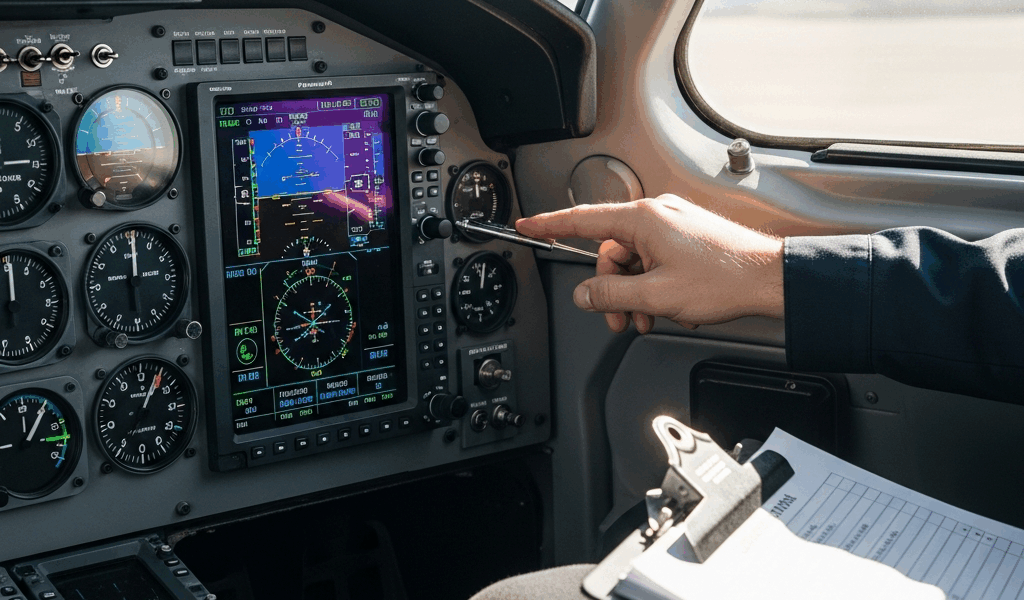
How to Know If Your G1000 NXi PFD Is Actually Frozen
A screen freeze during flight feels catastrophic until you realize you might be dealing with lag instead. I learned this distinction the hard way during a challenging approach into Denver — watching what I thought was a complete display failure resolve itself after 12 seconds.
True freezing means the Primary Flight Display stops updating entirely. The altitude tape doesn’t move. The heading bug stays locked. Most critically—you can’t interact with it. You press the FMS knob. Nothing happens. You tap the screen (yes, pilots do this). Still nothing. The freeze typically lasts anywhere from 3 seconds to 2 minutes before either recovering or requiring a reset.
Lag feels different. The display responds, but slowly. You turn the heading knob and wait a beat—maybe two—before the course line moves. Buttons register your input with visible hesitation. The airspeed tape creeps instead of flowing smoothly. This is annoying, not dangerous, and usually indicates overheating or software hiccup rather than failure.
Display artifacts—flickering lines, momentary black bars, color shifts—aren’t freezes at all. You’re seeing electrical noise or a failing backlight. The screen updates fine. Data flows. The system is working; something in the video chain isn’t.
Pay attention to what you see before it stops responding. Does the freeze catch the display mid-update? That’s typically software. Does it freeze with values that were on-screen seconds earlier? Hardware corruption. Does it freeze only after specific inputs — like pulling up approach plates or loading a new flight plan? Data processing issue. Probably should have opened with this section, honestly — the diagnosis determines everything that follows.
Emergency Cockpit Actions While Flying
You’re at 8,500 feet, climbing on an IFR flight plan, and your PFD locks up. Here’s what matters: keep the airplane flying first.
Verify your standby instruments immediately. Every G1000 NXi installation includes an independent vacuum-powered attitude indicator, altimeter, and airspeed indicator somewhere on your panel. Know where yours lives before you need it. If you’re in IMC and that PFD freezes, you’re transitioning to the six-pack within seconds. That backup isn’t a nice-to-have — it’s your legal requirement for single-pilot IFR flight.
Check your autopilot status. If the AP was engaged when the freeze happened, it often continues tracking the last known reference. This gives you time to work the problem. If it disengages—you’ll feel it—hand-fly to your standby instruments until you diagnose the issue. Never try to troubleshoot a frozen PFD while hand-flying in actual IMC. Declare priority to ATC and ask for vectors to VFR if necessary.
Attempt a soft reset from the cockpit. Press and hold the PFD’s SOFT RST button (usually on the GCU 470 control panel or accessible via the display menu) for 10 seconds. The screen will go black for about 20 seconds, then reboot. During this window, fly your standby instruments. The soft reset clears the display buffer without powering down the entire avionics suite. Many freeze events resolve with just this step.
Do not cycle your master switch in flight. This is what I see pilots want to do — just kill everything and restart. Terrible idea. Your alternator keeps running, but your vacuum pump, electric trim, and every other system loses continuity. If that reset doesn’t work, you’re now troubleshooting with partial power and no good outcome. Save the master switch for the ground.
If the soft reset doesn’t recover the display within 60 seconds, you need a plan. Continue on your flight plan using standby instruments and request lower altitude if you’re in IMC. Modern G1000 NXi systems often have dual displays — if your left PFD froze, verify the right MFD is working. You can use it to navigate and cross-check altitude, though it’s not ideal. Land at the nearest suitable airport. This isn’t panic. It’s professionalism.
Ground-Level Diagnostic Steps
Once you’re on the ground, power-down sequence matters.
Start with the full master switch cycle. Turn the master switch completely off. Wait 30 seconds. This drains residual power from the system and clears volatile memory. Turn it back on and let the system initialize fully — usually 90 seconds of self-tests and startup screens. If you’ve never watched this, you’re missing diagnostic data. The system displays load percentages for each module. If anything stalls at 50% for more than 20 seconds, you have a module that’s struggling.
Next, check your firmware version. Press the Menu button, navigate to System Setup, then About. Write down the exact version number displayed for the PFD and GCU (Garmin Control Unit). Note the date the software was loaded. Call your avionics shop with these specifics. Garmin released several firmware patches between version 12.01 and 12.04 that addressed display freezing on older G1000 NXi installations with first-generation displays. If you’re running 12.00 or 12.01, outdated firmware is your primary suspect.
Check for system error logs. This requires avionics shop access in most cases — the logs live in the GCU memory and need proper diagnostic tools to read. However, if error codes appeared on your display during shutdown (usually displayed as “E001” through “E099”), photograph them or write them down. E047 specifically indicates display processor overload. E031 points to data corruption in the flight plan database. These codes narrow your diagnostic path significantly.
Verify your airport and navigation database currency. The G1000 NXi loads massive datasets for approach plates, airways, and airport information. An outdated or corrupted database forces the processor to handle missing data, triggering freezes during specific flight plan inputs. Connect via your avionics shop to check the database version — Garmin updates these quarterly. If your last update was over a year ago, this is almost certainly your problem.
Look for physical damage inside the avionics bay. If your aircraft experienced vibration, rough handling, or electrical stress, internal connections loosen. The PFD display module connects to the GCU via a shielded cable — if this connection is even partially seated, intermittent freezing is the result. This requires a technician to inspect, but it’s worth mentioning if you’ve recently had maintenance work done on your avionics.
Common Root Causes and Fixes
Software glitches account for roughly 70% of reported freeze events — at least based on conversations with other pilots and mechanics.
Corrupted flight plan caching causes freezes when you load approach procedures or modify flight plans in-flight. The system bogs down parsing bad data. Permanent fix: perform a database refresh. Your Garmin dealer can push a clean database to your system — usually $300 to $450 for parts and labor. DIY approach: navigate to System Setup, find Data and Databases, select Reset to Factory Defaults. Warning — this erases all your custom procedures and saved flight plans. Take a photograph of your setup before doing this.
Outdated firmware is the second common culprit. Each Garmin release addresses specific processor inefficiencies. Running version 12.01 on a 2019-era G1000 NXi display means you’re missing three years of optimization patches. Upgrade to the current version (12.04 as of my last check, though Garmin rolls these out continuously). A qualified avionics shop handles this — you shouldn’t attempt firmware updates yourself. Cost runs $800–$1,200 for the service call, though your dealer may credit this if they troubleshoot and find your freeze was version-specific.
Overheating sensors cause subtle freezes. The G1000 NXi processor has thermal throttling built in — if the GCU internal temperature hits 75 degrees Celsius, the system intentionally slows processing to prevent damage. A clogged air vent near the avionics bay is the usual culprit. Solution: ensure your avionics cooling system is clear. This might sound basic, but I’ve seen aircraft with lint-choked cooling inlets cause temperature-dependent freezes that only happen during hot-weather climbs. Your shop can verify GCU internal temperature via diagnostic tools.
A failing display module itself is hardware territory. If you’ve tried firmware updates, database refreshes, and soft resets, and freezes still occur, the LCD or its processor board is degrading. No DIY fix exists here. Display module replacement runs $3,500–$5,500 depending on your aircraft and whether you’re under warranty. This is why documentation matters — if you can show the freeze started immediately after a major electrical event or moisture exposure, warranty repair becomes possible.
When to Call Your Avionics Shop vs DIY
Here’s a decision tree that actually works.
If a soft reset resolves your freeze and it doesn’t happen again for a week, you’re probably dealing with a transient glitch. Monitor the situation. If it recurs, move to firmware verification and database update. These are low-risk DIY areas if you’re comfortable navigating menus. Worst case, you learn your system better.
If the freeze happens every time you load a specific approach, suspect database corruption. Call your shop. This one isn’t safe to DIY because corrupted data in the wrong place can cause unexpected behavior elsewhere in the system.
If freezing correlates with hot weather, high-altitude flight, or specific avionics bay configurations, document the pattern and bring it to your shop. This is diagnostic work requiring thermal imaging and GCU software access.
If a freeze occurs immediately after engine start or during specific sequences (like autopilot engagement), you have initialization or communication problem. Definite shop visit. DIY troubleshooting at this level wastes time and risks missing actual problems.
Warranty implications matter here. Most Garmin glass cockpit components carry 3–5 year warranties. If you attempt DIY work that goes wrong — say, you drop a GCU module during removal — you’ve voided coverage. Repairs that should cost $0 become $1,200 out of pocket. If your aircraft is within warranty, leverage it. Take detailed photos and notes of the freeze behavior before you visit. The more specific your description, the faster your shop isolates the cause.
One final thing: if you’re outside warranty and facing a $5,000 display module replacement, get a second opinion. Ask for a certified avionics technician unaffiliated with your primary shop to diagnose. You’ll pay for their time — usually $150–$250 — but it might save you thousands if the real problem is something simpler.

Stay in the loop
Get the latest flighttechtrends updates delivered to your inbox.