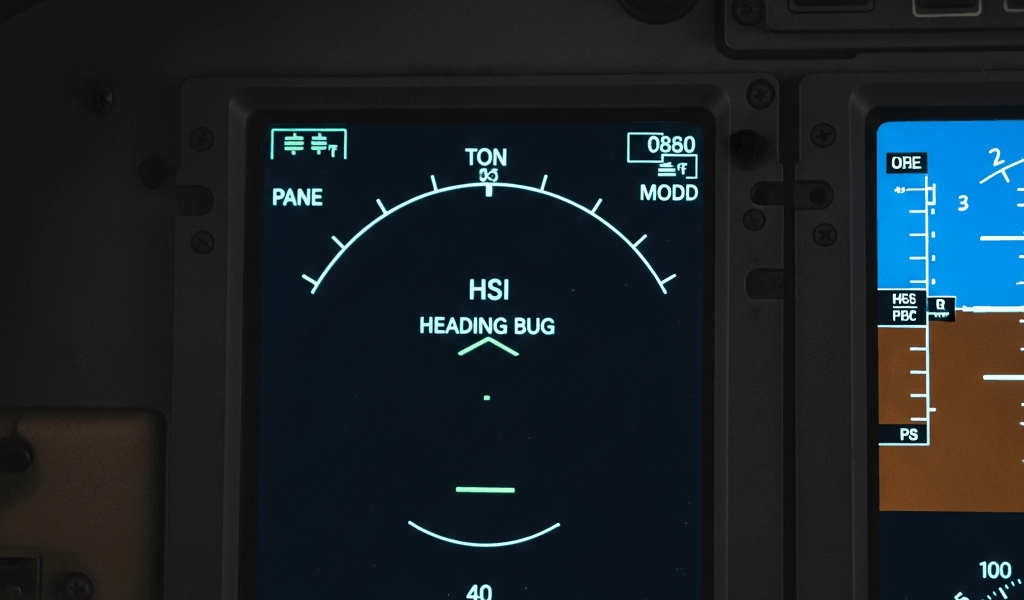
Garmin G1000 NXi Heading Bug Not Working—Fast Fix
As someone who’s been flying behind a G1000 NXi glass panel for six years, I learned everything there is to know about heading bug failures. One minute you’re setting your bug for a new heading assignment from ATC. The next minute it’s locked in place, won’t respond to the knob, or jumps to a random value. The panic sets in because you’re mid-approach and now you’re flying heading hold without a reference point.
Most pilots assume the unit is dead. It’s not. The heading bug not working is usually fixable in under 15 minutes—if you know which system is actually broken.
Why Your Heading Bug Might Be Stuck
Before jumping into fixes, let me separate the real culprits. I learned this the hard way after two separate troubleshooting sessions in my airplane, honestly frustrated that I didn’t catch it sooner.
Autopilot mode conflicts. This is the most common cause by far. If autopilot is in NAV mode or certain coupled approaches, the heading bug becomes a read-only display. You’re not seeing a failure—you’re hitting a software lock. I once spent 20 minutes turning the encoder knob before realizing my autopilot was still tracking a VOR station off my left wing.
Magnetometer calibration drift. The heading source itself can lose accuracy — if your magnetometer calibration has drifted due to airframe metal fatigue, panel-mounted electronics moving, or magnetic interference, the G1000 NXi stops trusting heading inputs. The bug will seem unresponsive because the system is protecting you from setting an unreliable target.
Software cache corruption. Sometimes the system’s internal memory gets confused about what the bug position is. A soft reboot clears this. Hard reboot (full power cycle) clears it completely. Most shops don’t tell pilots this because they’d rather bill you an hour of troubleshooting time.
Hardware encoder failure. The rotary encoder that reads your knob inputs can fail. That’s the only scenario where you actually need an avionics tech. Encoders typically cost $300–800 plus labor, and they require panel access.
Here’s the thing: three of these four issues you can test and fix yourself in the cockpit.
Quick Reset Checklist Before Deep Troubleshooting
Run through these checks in order. Each takes less than two minutes. Most heading bug issues die right here.
- Verify autopilot is fully off. Press the AP button until all mode annunciators clear. Count to three. Turn your heading knob and see if the bug moves. If it moves, you’re done—this was the problem. Typical time: 30 seconds.
- Check that NAV mode is not engaged. Even with AP off, NAV mode can lock the heading display. Look at your PFD softkey menu. If NAV is highlighted, press it to deselect. Try the knob again. Typical time: 45 seconds.
- Confirm your magnetic compass is set. Swipe right on the PFD to access the Heading page softkey. Look at the compass rose. If it’s grayed out or shows no directional information, your magnetometer isn’t initialized. Typical time: 1 minute.
- Check system brightness. Weird but true — if the heading display is set to zero brightness, you won’t see the bug move. It’s moving, you just can’t see it. Increase PFD brightness to 50% and retest. Typical time: 20 seconds.
- Soft reboot the G1000 NXi. Press the MENU button, navigate to System Setup, select System Restart, and confirm. The screen will go black for about 60 seconds. This clears memory cache without losing configuration data. Typical time: 90 seconds plus reboot cycle.
If the heading bug responds at any point during this checklist, stop. You’ve found the issue.
Step-by-Step Fix for Heading Bug Sync Failure
Didn’t work? Then you’re dealing with a deeper sync problem between the heading encoder and the display system. This is still fixable without opening the panel.
Step 1: Access the Heading Select menu. On your PFD, press the MENU softkey. Select System Setup. Navigate to Autopilot Settings (or Flight Director Settings depending on your configuration). Look for Heading Select or Heading Bug Calibration. Write down the exact menu path for your software version—they’re slightly different across revisions.
Step 2: Clear the cached heading value. In the Heading Select submenu, you’ll see the current bug position displayed numerically. Some G1000 NXi units have a “Reset to Current Heading” option. Select it. This forces the system to forget the old stuck value and adopt your present heading as the baseline.
Step 3: Test encoder responsiveness. Exit the menu. Slowly turn your heading knob three full rotations clockwise. Watch the numeric heading display at the top of your PFD. It should increment by one degree per click. If it jumps, skips, or doesn’t move, your encoder is failing and you’ll need shop work. If it moves smoothly — increment by increment — proceed.
Step 4: Force a display refresh. Press MENU again. Select System Setup. Find the option labeled “Clear Display Cache” or “Refresh Heading Source.” If neither exists in your version, perform another soft reboot. The display and the internal magnetometer data need to resync.
Step 5: Retest in a straight line. Exit the menu. Fly straight and level for 30 seconds. Your heading should stabilize within ±2 degrees of your magnetic compass. Rotate the knob. The bug should move instantly without lag. If this works, the sync failure is resolved.
Probably should have mentioned this earlier, but keep the aircraft level during these tests. Any bank angle will make your heading wander and you’ll think the fix didn’t work when it actually did.
Magnetometer Calibration When Heading Bug Drifts
If your heading bug moves but drifts slowly over time — or if it’s accurate but won’t change when you turn the knob — the magnetometer is often the downstream cause.
That magnetometer sensor feeds true magnetic heading data to the entire system. If it’s dirty, drifted, or never properly calibrated for your airframe, the G1000 NXi treats all heading inputs as suspect and locks them down.
Recalibrating the magnetometer is a 10-minute procedure you can do without pulling the panel. Garmin specifically designed it for pilot self-service.
Location matters. Find a taxiway or ramp area at least 300 feet away from any other aircraft, hangars, or large metal structures. Your airport’s run-up area works perfectly. Do not attempt this near the fuel pumps, maintenance hangars, or parking lots full of cars. Magnetic interference will invalidate the calibration.
The procedure: Press MENU. Select System Setup. Find Magnetometer Calibration (exact label varies by G1000 NXi variant). Select Begin Calibration. The system will ask you to fly a series of gentle turns — 30-degree banks left and right, smooth climbs and descents, and a full 360-degree turn. Hold each maneuver for 10–15 seconds. The system is sampling the magnetic field around your airframe from every angle.
Once you complete the turn sequence, the system will either confirm calibration success or report failure. Success means the magnetometer now has a baseline for your aircraft’s unique magnetic environment. The heading bug should immediately become responsive again.
Failure indicates serious magnetic interference or a hardware problem. Only then should you consider a shop visit.
When to Stop Troubleshooting and Call Your Avionics Tech
Know when you’ve hit the wall. Continuing to troubleshoot beyond this point uses flight time that costs you money and introduces unnecessary risk.
Red flag: The heading bug knob produces no response after Step 3 above. If you rotate it three full turns and the heading display doesn’t change by a single degree, your encoder is physically broken. This requires panel access and replacement. Cost: roughly $400–900 including labor and test time.
Red flag: The system reports a magnetometer hardware error code. When you access System Setup, some G1000 NXi units display diagnostic codes. Any code containing “MAG,” “HEADING,” or “ENCODER” with a status of FAIL means the sensor itself or its wiring is compromised. Repair requires shop diagnostics.
Red flag: Multiple heading-dependent instruments are failing. If your HSI, autopilot heading mode, and heading bug all fail simultaneously, the fault is upstream in the magnetometer or system bus. This is system-level and requires bench work.
Red flag: Magnetometer calibration fails twice. If you run the calibration procedure twice in different locations and it fails both times, the sensor hardware is likely degraded. Book the shop appointment.
I know it’s tempting to keep debugging when you’re staring at your own aircraft. But avionics troubleshooting beyond the steps above—especially anything involving the magnetometer sensor or internal encoders—belongs with certified technicians. The $100 you save in troubleshooting costs you ten times that in flight delays and uncertainty.
Your heading bug will come back. Most of the time, it comes back in your cockpit during preflight using the checklist above.

Stay in the loop
Get the latest flighttechtrends updates delivered to your inbox.